Implementing LLM Voice Calls
An idea that has lingered in my head ever since ChatGPT came out was that of LLM voice calls. Imagine being able to simply call your AI from your Nokia 3310 and being able to ask it to do anything for you. As an active traveler that often goes to remote places for adventuring, I'd love such an interface with the highest intelligence of currenet society. It's not always possible to have a computer with a huge battery, or even an internet connection.
On a sunny sunday in the Netherlands, I decided to take a closer look to the possibility of this magical idea.
I've recently migrated my entire codebase to Bun.sh. For WhatsApp and SMS integration I have already used Twilio. Therefore, I quickly came to these two guides:
But this is next level. Let's take a step back first. We need to first implement voice calls in the first place. After reading the twilio docs I came to these steps that I could take:
Step 1 is to initiate the call:
Step 2 is to have a conversation in realtime:
Optionally, we can do more things like this:
A couple days ago I implemented a regular endpoint to receive a call (receiveTwilioCallWithContextRaw) and to send one (sendPhoneCallMessage). This is basically step 1. It works sufficiently well for one-time messages. I've integrated this into KingOS to make it possible to call anyone in your network with a phone call. The person that picks up will receive a generated voice that says a message. After that, the person can reply something and hang up the phone. The response is then sent to a webhook to process with Whisper, and the message is sent as audio + text back into the chat. I'm very happy with this simple implemenatation.
Latency
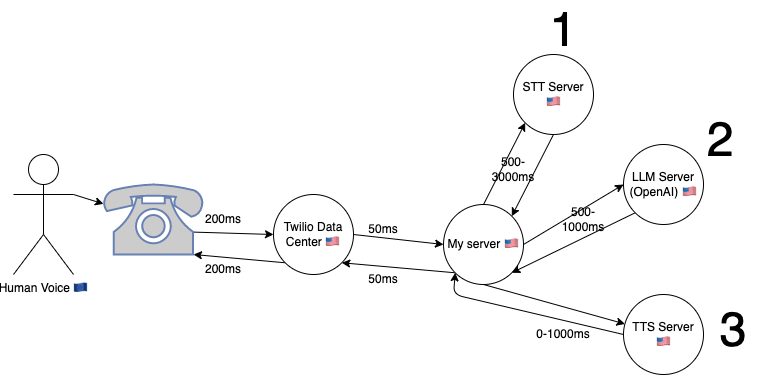
I drew this graph to make it clearer where the voice is going before another voice returns to the same user. As you can see, the voice needs to first come from the phone of the other end all the way to the USA. It then goes through 3 stages:
STT (Speech to Text): We can do this with either OpenAI's Whisper API, or maybe something like Rev AI or DeepGram which is more performant for realtime transcription. Depending on this choice the speed may vary a lot.
LLM (Large Language Model Transformation): We can use the OpenAI gpt-3.5-turbo streaming endpoint (chat completion). This gives us a first word within 250ms on average, and an entire sentence within 750ms most of the time.
TTS (Text to Speech): For this we can use play.ht for realtime voice generation. This is super high quality which is certainly the most fun. However, if we want to go for speed, we can also use local cli tools like
sayfor macos andespeakfor linux. This would reduce the time required by a second with ease (it's near-instant). The quality is a lot lower though.
Each of them has a latency, which is important to note. If you add everything together, we can expect to have at least 1.5 seconds latency before we get a response. Depending on our setup this may go up all the way to 5.5 seconds. Looking at this, I'm sure there's a big tradeoff between quality, cost, and speed.
Please note I've chosen to use API's here rather than doing everything on my own GPU(s). The reason for this is scalability. Since every server is in the US, I think every round-trip shouldn't add more than 100ms, so building our own in-house infra may reduce the total latency with another 300ms. This is next-level complex though to scale, so I don't think we should aim to solve this problem.
High-level overview

We can either receive incoming calls or create outgoing calls and stream them. According to Twilios guide you just need to provide the right TwiML XML to the response and it will start streaming when it's time. You can choose to stream it in two tracks or just stream one of them if you don't need the other. This allows you to differentiate who is who, which is great!
Today I'm going to try to make incoming calls stream. I already have a Dutch phone number that I am renting via Twilio, so I can easily make a call to it. The phone number sends incoming calls to my webhook at /function/receiveTwilioCallWithContextRaw.
What I want the behaviour of incoming calls to be:
- Say 'Operator' (A way to state the AI is listening, inspired by the Matrix 😎)
- Make sure it will start the stream and doesn't hang up.
- Receive the stream in my websocket
- Detect silences in the audiostream
- Send this audio onwards to whisper after a silence is detected of at least a second.
- Stream the transcription, with the right context, into a textual agent chatbot.
- Every time we get a sentence back, ask PlayHT to generate an audio for this, and make Twilio play this audio via TwiML.
Rougly this can be cut up into two pieces:
- A) The operator picks up and sets up the audio stream
- B) Wrapper around a textual agent chatbot that makes it able to handle realtime audio
It is important to note that A is custom for twilio and websockets, while B is something more generic that could also potentially be re-used for calls over the internet or completely offline even, if implemented well.
Let's start with A!
A) Operator, Setup the Stream
Let's set up everything in node.js with a temporary local server, similar to https://www.twilio.com/blog/live-transcribing-phone-calls-using-twilio-media-streams-and-google-speech-text
B) Realtime Voice Wrapper
2. Transcribe Asap
- Save incoming audio to a wav in realtime (see https://stackoverflow.com/questions/58439005/is-there-any-way-to-save-mulaw-audio-stream-from-twilio-in-a-file)
- Test incoming audio (every 100ms) against node-vad until we detect silence.
- If there's a silence, send the speech to a realtime api to immediately to get the transcript back.
- If there's a new thing being said, interrupt message-processing and save all deltas as new conversation history
3. Reply
- use
processMessage({message, isStream:true, callback }) - collect callback deltas until a sentence is formed. every sentence can be streamed to TTS (or can be done locally) https://docs.play.ht/docs/getting-started-with-playhts-realtime-streaming-api and https://docs.play.ht/reference/api-generate-tts-audio-stream
- the streamed audio can direclty be sent with ws.send (in the right format) to be queued and played
- interruption capability should stop sending if you interrupt
All in all, this would make for realtime
Conclusion
It will probably take me some long evenings to reach this point. Hold tight!
ChatGPT on the phone via a premium-rate-number?
If all my chatbots were also available via callling a phone number, it would allow for a very interesting new interface. I'm working on this (read more at llm-voice-calls.md).
Last spring a friend suggested I could allow a voice interface on a paid phone number. What if old people that aren't familiar with the internet, that usually barely use technology, can simply access an AI like ChatGPT by calling a phone number? What if we can earn money from this target audience by charging per minute on this phone number? This could be a huge untapped market right there, so it's interesting to explore this.
The service Twilio offers is amazing, but they don't offer premium-rate numbers. But life does't stop at what twilio offers! What if we can connect a premium-rate-number service to a Twilio service? After some research, I discovered this may indeed be possible.
I found these companies that seem to offer premium rate numbers internationally:
It seems that they all have the ability to forward the number to Twilio. Can't be sure though, but if it's possible, that means we can make every twilio phone number paid. The only thing is that it might be difficult to route it easily to the required purpose, and there may be setup costs + time, and operation costs to keep lots of numbers available.
Therefore, I contacted them to figure out the details...
UPDATE 22th of august, 2023
I just called with somenoe of https://messagetothemoon.com. They are charging money for a paid phone number: €390 for the first year, then €25/month. With something called "SIP Trunking" they allow me to redirect phone numbers from any country to a phone number of twilio. This would allow me to charge anything between €0.10 per minute to €1.15 per minute. Regulations differ a lot per country, so it's something manual to setup for every country.
As a first test after I've got it stable with Twilio would be to get a paid number for the Netherlands. If this works, we can partner with someone to promote this. We can also market our own stuff with this number, because it would reduce the onboarding cost to near-zero because people pay from the first second.
TODO
I will further keep this article up to date as I progress in this use-case.
Initially I need to finish llm-voice-calls.md
After it fully works, I'll probably do a first test. I'll keep this posted!
Making voice UX possible
I've built an operating system now that allows me to do a lot of stuff, from writing, to coding, to managing email, whatsapp and even search things online in a browser. But ultimately I want to work from nature, this is one of my bigger goals. My current UX is still built around screen UX mostly, but this doesn't need to be this way. The UI is, on top of that, also super useful for an AI to manage lots of things. So let's see what needs to be there in order to make the best Voice assistant ever.
Commands that I think would be super useful:
File commands
- Search files X
- Open file X
- New file (Name:X)
- Prompt file
- Append to file (starts record)
- Clean file (starts record)
- Cancel recording
- Push recording
- Read file
- Stop reading (Cancel)
- Skip (to next alinea)
Message commands
- Open chat X
- Find chat (query:X)
- List recent chats
- Read chat (from/to X | unread)
- Skip (to next message)
- Prompt chat (record)
- Transcribe message (starts record)
- (re)write message (starts record)
- Read written message
- Cancel (anything)
- Send message
❗️ On top of this, I need to be able to listen to music/videos/podcasts/books and other media and I should be able to read aloud articles online or entire discussions e.g. twitter, indie hackers, etc. However, this could ultimately also become different plugins, so it's ok to wait with this.
❗️ Besides, some guiding commands can be useful, but they can also be conversations ultimately, with plugins. So let's wait with this. Things like your calendar, summarize new messages, etc.
❗️ Please note, that above commands are not only useful as frontend-steering commands, most are also quite useful to be used via chat and by AI, as plugin. I should therefore keep this in mind and create a universal api that is usable as AI plugin so it can be used in all different ways.
To start, what I can do:
- use
useVad(@ricky0123/vad-react) to catch sentences and send to server to instant transcribe. (blocked by bun) - optimise for accuracy and speed of all above commands
- Some commands tie to a certain context that is usually in the hyperlink of the UX. all this state should now be kept somewhere in the backend (
Person.state?) - All commands can be turned into AI plugins, some of which work differently for the frontend compared to when the AI would use it in a text interface. Some of which wouldn't be needed for non-frontend.
- All commands can be wrapped by the browser via the API that sends voice and returns an action.
- All actions need to be executed properly by the browser
Once I have this, I should be able to go for a walk and control my entire work with my voice. This is the start of a new way of working!